In the previous article, Announce my IP range, I explained how to announce your ASN IP ranges from a debian router. Now, we need to secure our ranges to prevent them to be hijacked. This article will guide you to setup RPKI on your ranges depending on your provider. Also, we’ll see if you are announcing and correctly importing routes.
What is RPKI? #
RPKI provides cryptographically verifiable information allowing network operators to verify whether an ASN is authorized to originate a prefix. This process is called Route Origin Validation (ROV).
- The prefix holder creates a ROA through their RIR/LIR, specifying which ASN is authorized to originate the prefix and the maximum allowed prefix length.
- RPKI relying-party software downloads and cryptographically validates RPKI objects, producing Validated ROA Payloads (VRPs).
- The router retrieves these VRPs from an RTR cache, such as
rtr.rpki.cloudflare.com:8282, and uses them to classify BGP announcements as Valid, Invalid, or Unknown.
How to set it up #
Lagrange Cloud #
They became LIR themselves, so the procedure is not up-to-date, but it seems that is self service now. If you have your prefix before that, you need to open a support ticket, or you have a button to open one automatically. Personally, it took 3 days to have it enabled, but since it is self service, it should be near-instant.
Scaleblade #
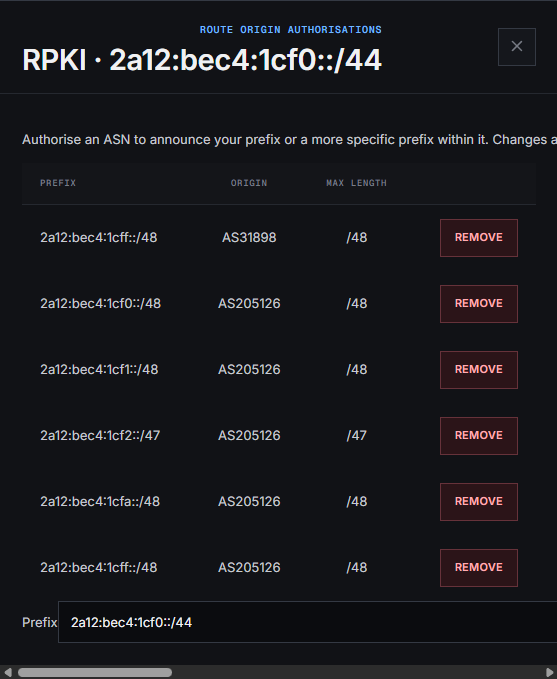
Go to your IP range list, click on RPKI. Then you’ll have the form to configure it/them. While filling the max length, make sure to make it the most restrictive as possible.
Wait #
There is nothing to do more than wait. RPKI validators can take several hours before updating certificates, and giving a route valid.
By default, if nothing was done, routes are RPKI Unknown, meaning that no ROA exists for these prefixes. Also, accepted by anyone accepting RPKI unknown routes.
Testing #
Now we’ve waited several hours, we can test and see if everything is valid and properly configured.
Looking our routes #
You can check your route validity by going on BGP.Tools, bgp.HE.net or Cloudflare Radar.
In the case of Cloudflare Radar, go in routing, then RPKI and search your ASN.
You’ll see this:

If all your routes are valid, congratulations!
Are we rejecting RPKI-invalid routes? #
Now, we are doing things properly, but are we rejecting potentially hijacked routes?
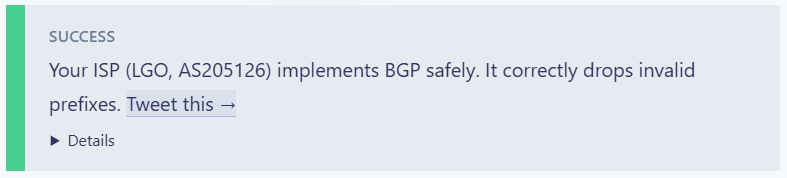
If you go to isbgpsafeyet.com, and click on the blue button, while forwarding your whole traffic through your router. You should see:
Make sure your BIRD configuration revalidates imported BGP routes when the RPKI table changes, especially during startup.