Since my 2nd year at Epitech, I have been very curious about how the internet works. I indeed worked for a local ISP (but not on the internet part), but it was like a mistery black box for me. I wanted to understand how it works. That year the idea was desappearing from my mind. Then in my 3rd year at Epitech, I started to invest on a rackable server (even if I don’t have rack at home), then I started to host some services on it, and to expose the services I always used a reverse proxy on a VPS. But I felt limited by this solution, I had to put a wireguard client on each VM, and it was not very scalable, even for just typing IPs in the browser. So I started to think about how to do it better, and I found the solution: BGP. I started to use BGP on my VPS and my homelab router to announce all the IPv4 range I used in the lab, so that I could add another interface, vlan, or whatever, the range was accessible from my VPN. But to had to keep asking my friends to use a VPN to access my services, and I wanted to go further.
Learning BGP on DN42 #
While I was not so happy of the network on my homelab, I discovered DN42, a large VPN network where everyone can create its own ASN and exchange routes with other members. It is a great way to learn BGP and how the internet works, without having to deal with the real world. So I created my own ASN, AS4242423706, and started to learn BGP, how to configure it, how to exchange routes with other members, etc. I also learned a lot about networking in general, and I really enjoyed it. But I felt limited on what I could do on DN42, I wanted to go further, and to be in the real world. I maintained the DN42 router for a while, but without hosting any services on it, I felt it was not very useful.
And the idea left my mind again, but keeping coming back when I was thinking about my homelab. Like an obsession.
But before everything, you need some explanations.
What is a RIR? #
So first of all, you need to understand what is a RIR, a LIR, and an ASN.
A RIR is an organization that will attribute IP resources over a region. There are RIPE NCC (Europe+middle east), ARIN (NA), Afrinic (Africa), APIC (Asia-Pacific), and LACNIC (South America).
As I am a French citizen, I can directly ask to a LIR or create my LIR to have an ASN.
What is a LIR? #
A local Internet registry (LIR) is an organization that has been allocated a block of IP addresses by a RIR, and that assigns most parts of this block to its own customers.[12] Most LIRs are Internet service providers, enterprises, or academic institutions. Membership in a regional Internet registry is required to become a LIR.
— Regional Internet registry on Wikipedia
Being a LIR is quite expensive so for an educational project it is mostly not worth.
What is an ASN? #
An ASN is a number that identify your network all over the internet. It is used to indicate what IP is attached to and who (organization or people).
In RIPE NCC we are lucky, they allow individual to apply for an ASN through creating your own LIR or by asking to another LIR.
In my case, I am pretty bad at all kind of paperwork and I don’t have +1k to spend per year, so I decided to ask someone to create my ASN.
Getting my own ASN in the real world #
After 4 years of thinking about it, I finally decided to go for it. I wanted to have my own ASN in the real world, to be able to announce my own IP ranges, and to be able to host my own services without having to rely on a VPS or a VPN. So I reminded about all my research on how to get all the resources I need to get an ASN and an IP range. I found that the ASN was not so expensive, and the IPv6 range neither.
The only problem was to find a reliable LIR (Local Internet Registry) to get my ASN and IP range from. After a lot of research, and comparison between different LIRs, I finally found one that was reliable and not too expensive: LagrangeCloud.
I asked all the questions I had to the support before applying, and they were very responsive and helpful.
So I applied for an ASN and a IPv6 /48 PA range.
RIPE Database object creation part 1 #
Before creating your ASN and have your IPv6 allocation (even v4), you have to create some RIPE database object.
You have to create a maintainer, a person, and an organization.
A small warning here, something to know before doing anything, all the information in the database is public. Anyone in the world can the the information you enter, see your address, phone number, email, etc.
Create a RIPE NCC account #
Before creating your objects, you need to create a RIPE NCC account, it is very simple to do so.
Create a maintainer/person objects #
Now you have your account, you can go to the RIPE NCC Database.
On the left side, you can see a “Create an Object” button, click on it.
And then they ask you what do you want to create, in our case (you are an individual), you select “role and maintainer pair”, then “Create”.
You will found this form:
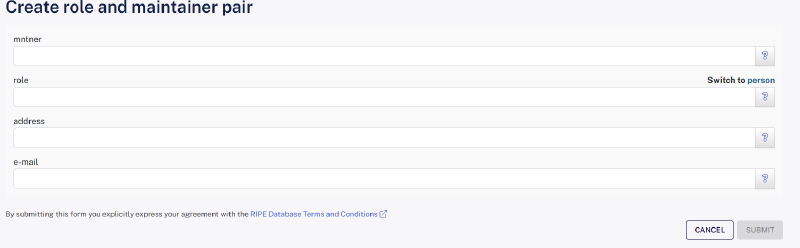
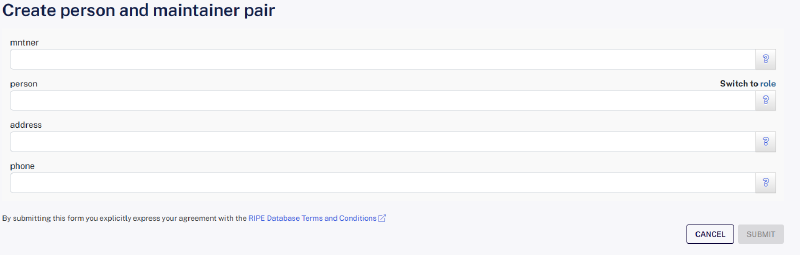
- In the
mntner, you have to create an identifier (e.g.MYNAME-MNT) - In the
personfield, it is you full name. If you have 3 first names, you MUST write them as it must match your ID. - In the
address, they want you to put your full address in the<number> <street>, <city>, <state>, <zip>, <2 letter country>format (e.g.666 rue du Brocoli, Paris, Ile-de-France, 75021, FR) - The last field, you need to enter your phone number. They don’t really verify it, but it is better to give a valid one just in case. For exemple, I have a VoIP number in that field. (e.g.
+33 1 23 45 67 89)
After this, you can click on the submit button. The page after, they give you a recap with the person id and mnt id. YOU NEED TO KEEP THEM BOTH.
Create the organization #
You need to return to the create an object tab, and select organisation in the list.
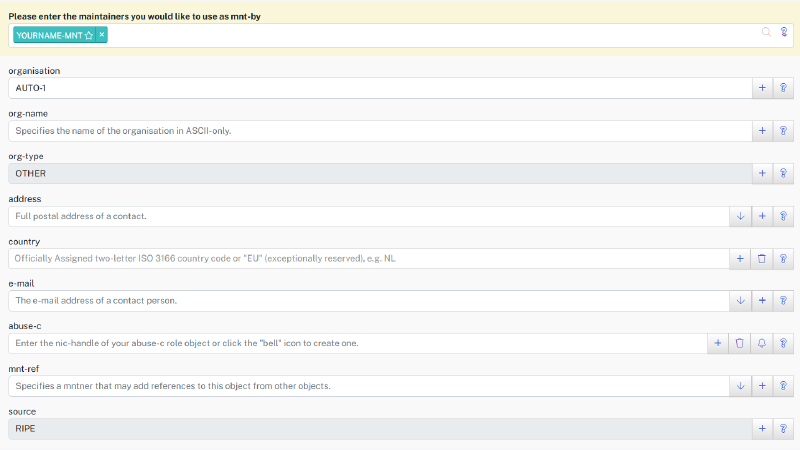
- Don’t touch the maintainer part, it will auto fill this field
- Also don’t touch the
organisationfield, it will generate you a name - In the
org-namefield, you need (if individual) to put the same name you gave earlier. org-typecan’t be touch, but if you manage to change the field, leave it onOTHER- The
addressfield must match your person address, the one you gave earlier countryis where you live (e.g.FRfor France)email: an email that people can use to contact youabuse-cis the abuse contact, if your network has a malicious software that attacks others computer, some people can reach you to perform actions. To create an abuse contact, you need to click on the bell icon and in the modal give an email (e.g.abuse@example.com).- In the last field (
mnt-ref), you have to put your MNT object (e.g.YOURNAME-MNT) and your LIR MNT (e.g.YOULIR-MNT) object.
Once your are done, click on submit, and the page will give you your organization id.
ASN application #
Now you have done the object creation part 1, you can apply for an ASN.
You can find plenty of LIR around the internet, they may have different price, but I think if you read this you have done your own research.
Before doing your application, you need to find two peers, it is a requirement fixed by the RIPE.
You will find many people that will happily give you the name of two peers.
I went myself for Lagrange Cloud, they asked me all the information above, as such as the maintainer, the person and the organisation.
In the case of Lagrange, you can use their BGP Tunnel or instance to have the “2 peers required”.
As an ASN is not free your LIR will ask you to pay beyond this point to complete the procedure.
Once the payment is done, the assignation is really quick, it took 3 days for me, and 3 because I did a mistake on the RIPE objects.
RIPE Database object creation part 2 #
After all this waiting, you may have received an email saying that you have now an ASN and an IPv6 range (varies from LIRs).
Before announcing your IP ranges, you need to create the route, or route6, for your allocation.
See your resources in the Database #
On the RIPE database, on the left pane, you will have the “My resources” section, you can click on it, and you see now 3 tabs: IPv4, IPv6, and ASN.
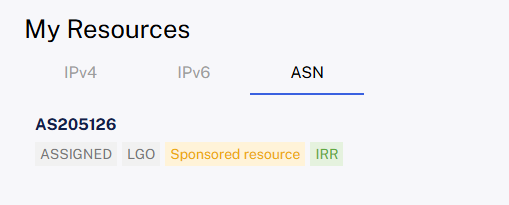
assigned, the name is LGO (I did not find a better name 😕), but it is also a Sponsored resource that globally mean to run my AS, I need a LIR.
The IRR means that I have a route on that ASN.
Let’s create that route #
In the IPv6 tab, you can find your IPv6 range.

Keep that IP range in mind (or in the notepad), and go to the Create an object section, again…
In the object type, you need to select what is your IP range, if it is an IPv4 you need to select route, or for v6 route6.
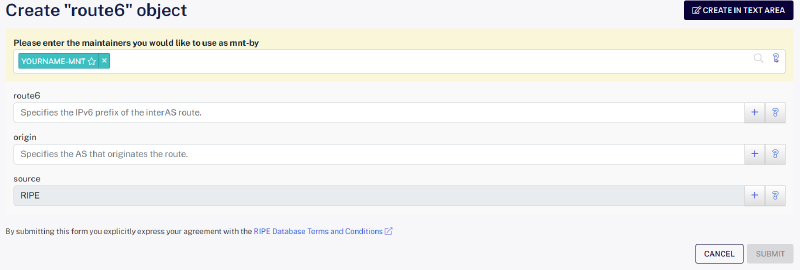
In the route(6?) field, the given IP range by the RIPE database, as marked above, and the origin is your ASN in the format ASxxxxxx. Then click on submit, and now you will see the IRR mention on your resources.
Conclusion #
As you can see it is simple to ask your ASN to become your on own ISP.
In the next article, we will see about announcing your IP range.